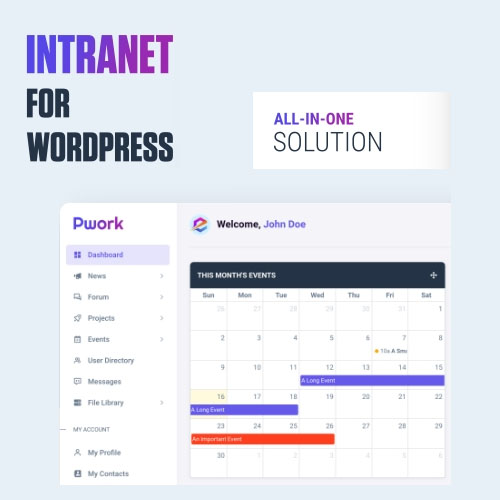
Pwork – Intranet For WordPress
All In One Intranet Solution
You no longer need to use a bloated theme and a bunch of plugins to create your own intranet platform. Pwork works with any theme and comes with everything you need!
Personal Dashboard
The user dashboard includes drag-and-drop sortable widgets that provide users with data specific to their needs and actions to take. Widgets can be enabled or disabled easily.
News & Announcements
A platform where you can share company news, updates and announcements with your team. It’s similar to a WordPress blog but only for your team members…
Discussion Forum
The discussion forum helps your team improve communication and knowledge sharing. Tags and a search box allow users to easily find what they are looking for.
Projects
This is where your team can collaborate on projects and track progress. Notification emails are sent to members when a new event occurs, such as a completed task.
Events Calendar
Events calendar is a tool used to manage and organize events, meetings, and tasks. It allows you to inform your team members about upcoming events with its user-friendly interface.
User Directory
Each user has a profile page that summarizes information about the user. The user directory allows your team to easily find contact information and communicate with each other.
Private Messages
The built-in private messaging system allows your members to chat with users in their contacts in a secure environment.
Knowledgebase
An internal knowledge base is a centralized database of company resources that serves as the first point of call for most, if not all employee inquiries.
File Library
Pwork comes with a centralized document storage that is a secure and organized location for storing and sharing your company documents, policies, and files.
Other Key Features
- User Settings: Users can edit everything on their profile, including profile details, contact information, and email notification preferences.
- Role-Based Access: You can choose which user roles are allowed to add new posts, projects, topics, send private messages, or upload files.
- Email Notifications: Users receive notification emails about new activities if they have enabled in their profile settings.
- Lightweight And Fast: Pwork is built on a modular structure using modern technologies such as Bootstrap 5 and AJAX. You can disable features you will not use.
- Highly Compatible: Pwork works on a dedicated area on your site. This makes the plugin highly compatible with all other plugins and your theme.
- Regular Updates: We regularly update the plugin to add new features and to keep the plugin secure, stable and fast.
- Plugin Settings: Pwork comes with an advanced settings panel which allow you to disable features you will not use, restrict access to certain areas, change logo etc.