
0 item(s) in your cart
|
$ 0.00

Quick highlights & key features
Download the plugin zip file from your account.
Go to Plugins > Add New > Upload Plugin and upload the zip.
Click on Install Now and wait for the installation.
Click on Activate Plugin to start using it on your website.
Go to plugin settings and configure as per your need.
Event plugin WordPress is a fully functional plugin that can work with all WordPress themes, easily setup and customize without any coding skills.
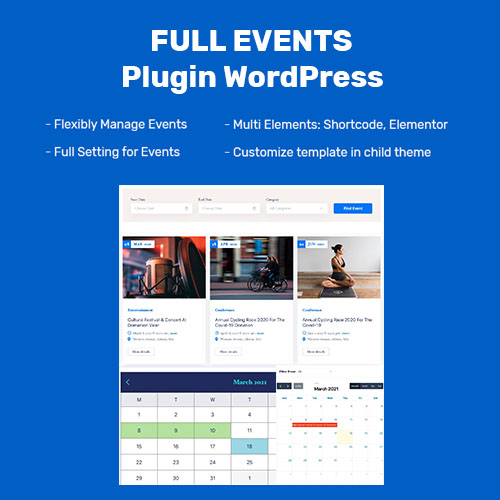
The plugin supports event organisers displaying their event listings in an attractive way to grab attendees’ attention. Besides, it provides outstanding features to optimize users’ experience: advanced event search filter, AJAX filter, simple calendar and full calendar, slide …
Our beautiful view for a single event makes a strong impression on customers at the first look. The page offers detailed information regarding the event title, organizer’s name, date, time, venue, location of the event and brief description.
You can build template of event detail in Elementor Page Builder. The plugin support full elements for build template. You can read documentation for detail.
Event listing layout options we supply help to enhance user experience by letting them choose the way event listings appear on the site.
2 options we create:
– Event listing box layout: With this layout, listed events will be showcase with a large image that make events attractive.
– Event listing line layout: When visitors choose event listing line layout, event listing will be displayed in chronological order.
Besides, customers can select to show event listings with sidebar or no sidebar.
Our advanced search form will support customers filtering events based on start date, end date and category with a or two clicks. Besiders, looking for events according to customers’ needs becomes more convenient with the ready to use calendar attached in “ start date ” field and “ end date ” field.
AJAX Filter gives users better experiences in searching events. You can find events that are suitable for your purpose without reloading the page.
The customer can search event with start date, end date, Category and display result in page quickly.
You aren’t worried about coding skills when you use our user-friendly admin dashboard interface because with only some steps, you can easily create, edit, delete, cancel any event.
In Admin Dashboard, you can add unlimited categories such as music, sports, clubs, dance … and assign events to these categories. Therefore, when customers click on a particular category, all events assigned to that category will be shown.
We offer 2 calendar options for you to select:
– Single Calendar: In the single calendar, you can see which days events will take place. Besides, When you click on a particular day, the event listing of that day is displayed
– Full Calendar: With the full calendar, you can also see which days events will take place but you don’t need to click on a particular day to know which events take place on that day. All events are displayed right in this full calendar interface.




Buy with confidence, 100% untouched file, Original scripts no tweaking.
All Plugins & Themes are scanned with Norton Antivirus on a regular basis.
Secure Payment Transactions with SafePay, Debit, and Credit Cards.
Get quick updates for your plugins & themes as soon as published by author.


Give your website wings with our GPL plugins and themes – where freedom meets functionality!
Our customer support team is here to assist you.
!!! IMPORTANT!!!
The directory features items designed & developed by Third-Party Developers and distributed by Pluginfy under the General Public License (GPL). Pluginfy maintains no affiliation with, nor does it endorse any products and logo listed on this platform.

